
Unlock Your Creativity with Whisk AI
Transform your ideas into breathtaking visuals effortlessly with Whisk AI’s innovative features. Experience the future of creativity today!

Are you tired of writing long, complicated AI prompts and still not getting the image you had in mind? You’re definitely not the only one. For years, creating good AI-generated images meant learning prompt engineering, which is basically a skill in itself. Most people gave up before they even got started.
That’s exactly the problem Whisk AI was made to solve. It’s a free AI image tool from Google Labs that lets you skip the complicated prompts and use images instead. You just pick a subject, a scene, and a style, and the tool creates something entirely new from those three inputs. No technical knowledge required; no subscription needed. This guide covers everything you need to know about this tool: what it is, how it works, what makes it different from other tools, and why it’s quickly becoming one of the best free image generators of 2026.
What Is Whisk AI?
Whisk AI is Google Labs’ experimental AI image generator that creates new images by blending three visual inputs: a subject, scene, and style. It was launched to the public in late 2024 and has grown rapidly since then. The tool is built on two of Google’s most advanced AI models: Imagen 3 for high-quality image generation and Gemini for understanding the content of uploaded images.
Unlike most other AI image tools, Whisk AI doesn’t ask you to write text prompts. Instead, it lets you use images as your input. You upload photos for three different roles: a subject (what or who is in the image), a scene (where it takes place), and a style (how it should look). The tool then blends these three inputs into one new, original image.
The name “Whisk” refers to exactly that idea: mixing things together, much like you’d whisk ingredients in a bowl, and the result is something fresh and new. The official platform is available at labs.google/fx/tools/whisk, where users can access this powerful tool completely free. Since its launch, it has attracted hundreds of thousands of users who want a simpler, faster way to create AI-generated visuals.
How It Works: The Three-Input System Explained
At the heart of Whisk AI lies its intuitive three-input methodology that makes AI image creation accessible to everyone.
1. Subject Definition
The subject is the primary focus of your image. You can either upload a reference image or provide a text description. For example, say you upload a photo of a cat. The platform’s computer vision algorithms analyze that image to extract information about shapes, colors, textures, and composition.
2. Scene Selection
The scene provides the environmental context and background for your subject. From tropical beaches to futuristic cityscapes, Whisk AI lets you specify exactly where your subject exists. Upload a picture of a beach, and the tool understands the setting you want.
3. Style Application
This is where the real magic happens. Upload a watercolor painting as your style image, and the tool will generate a new image of a cat on a beach that looks like a watercolor painting. It is that straightforward.
There is also a text prompt box if you want to add extra details, but you don’t have to use it. The images do most of the talking, and this approach makes it one of the most beginner-friendly AI image tools out there.
The Six Default Styles
Whisk AI offers six meticulously crafted default styles, each producing consistently recognizable visual outcomes:
|
Style |
Description |
|---|---|
|
Sticker |
Bold outlines, vibrant flat colors |
|
Plushie |
Soft textures, rounded forms |
|
Capsule Toy |
Glossy, collectible-style miniatures |
|
Enamel Pin |
Metallic finishes, hard edges |
Each style consistently applies its unique visual characteristics regardless of subject matter, ensuring that diverse subjects receive cohesive treatment within the same style category.
The Technology Powering the Magic
Under the hood, this isn’t just a basic image mixer. It runs on highly advanced transformer-based neural networks and diffusion models. When you upload your subject and style, the system uses complex “attention mechanisms” to figure out exactly which parts of your image to preserve and how to seamlessly apply the new aesthetic. All of this heavy lifting is powered by Google’s massive distributed computing infrastructure and specialized Tensor Processing Units (TPUs), which is exactly why it can generate high-quality images in a matter of seconds.
Why Google’s Tool Is Different From Others
There are dozens of AI image generators out there. So what makes Google Whisk AI stand out from the crowd? Most tools, like Midjourney or DALL-E, are built around text. You write a prompt; the AI makes an image. If the result isn’t right, you adjust the prompt and try again. It’s a process that requires experience and patience, and beginners often feel lost.
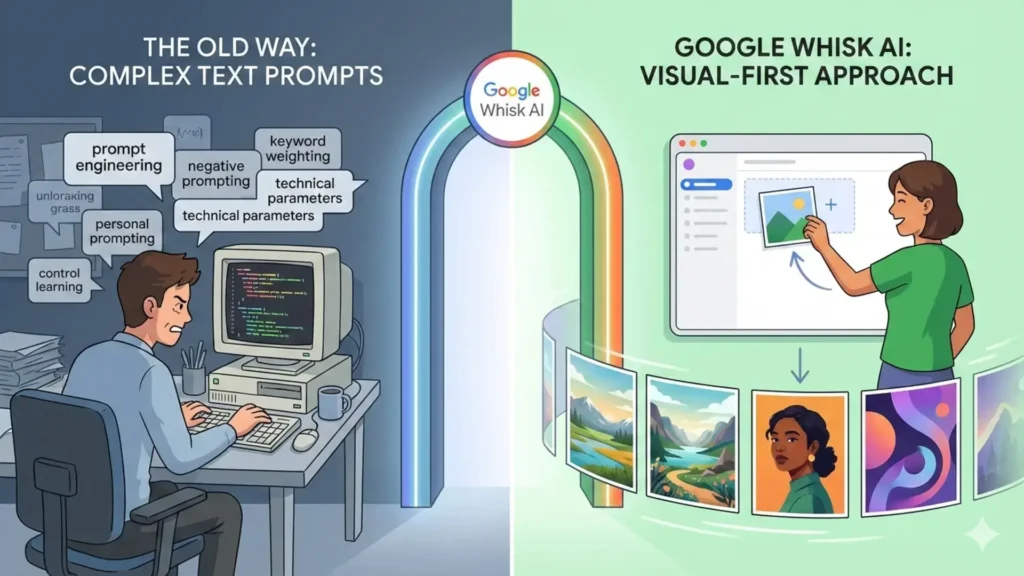
Until this tool emerged, getting the best results from text-to-image AI required specialized knowledge of prompt engineering: keyword weighting, negative prompting, style references, technical parameters, and compositional directives. This created a significant barrier for casual users who couldn’t achieve the same quality results as those willing to study these techniques.
This tool flips that entirely. It’s built around a visual-first approach. You don’t need to know terms like “cinematic lighting” or “bokeh effect.” You just find an image that shows what you mean, upload it, and let the AI figure out the rest. This approach is a breath of fresh air for people who think in pictures, not words.
Here’s a quick side-by-side comparison against the top tools on the market today:
|
Tool |
Free to Use |
Image as Input |
Powered By |
Best For |
|---|---|---|---|---|
|
Google Whisk AI |
Yes |
Yes (core feature) |
Imagen 3 + Gemini |
Visual creativity, beginners |
|
Midjourney |
No |
Limited |
Custom Model |
Professional designers |
|
DALL-E 3 (ChatGPT) |
Limited |
Limited |
OpenAI |
Text-heavy prompts |
|
Adobe Firefly |
Limited |
No |
Adobe AI |
Brand design |
|
Stable Diffusion |
Yes |
Yes |
Open Source |
Technical users |
|
Leonardo AI |
Limited |
Yes |
Custom Model |
Game art |
|
Canva AI |
Limited |
No |
Multiple |
Marketing teams |
|
Ideogram AI |
Yes |
No |
Custom Model |
Text-in-image |
|
NightCafe |
Limited |
Partial |
Multiple |
Art styles |
|
Playground AI |
Limited |
Yes |
Custom Model |
Hobbyists |
As this table shows clearly, it’s one of the very few tools that combines a truly free tier with a genuine image-as-input system powered by Google-grade infrastructure.
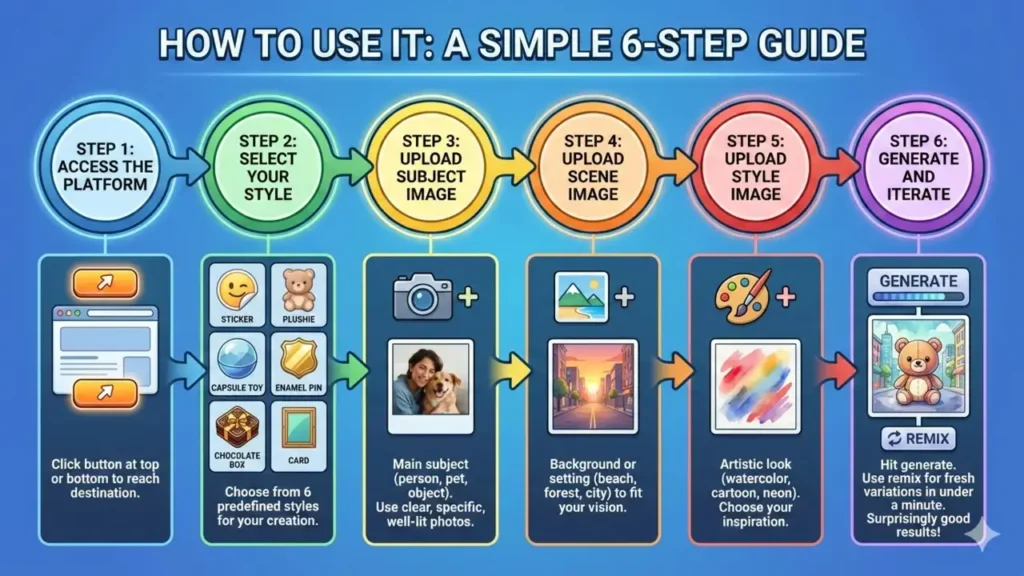
Step-by-Step Guide: How to Use It
Using this tool is simple, and that’s the whole point. The process was designed so that almost anyone can jump in without reading a manual.
Key Features: What You Actually Get
The feature set is focused and practical. It doesn’t try to do everything; it does a few things really well. Here’s what users rely on most:
Image-as-Prompt System
The core feature. Upload images instead of typing descriptions. This makes the tool accessible to everyone, regardless of technical background.
Three-Slot Input Design
Subject, scene, and style each get their own slot, giving you precise creative control without requiring any prompt writing skills.
Google Imagen 3 Quality
Imagen 3, one of the most advanced image generation models in the world, generates every image. The results are sharp, detailed, and realistic.
Gemini-Powered Understanding
Google’s Gemini model analyzes the images you upload and figures out what’s in each photo so the system knows how to blend them properly.
Free Access
There’s no paywall, no subscription, and no credit system. It’s free to use through your Google account.
Mobile and Desktop Friendly
The tool works well on both phones and computers, which makes it easy to use wherever you are.
Auto-Prompt Enhancement
Even though the tool is famous for its visual-first approach, it hasn’t forgotten about text. If you prefer typing out your ideas, the system acts like your personal prompt engineer. Type something simple like “sunset beach scene,” and its advanced natural language processing automatically transforms it into a highly detailed, professional-grade prompt—adding the perfect lighting, mood, and atmospheric details for you.
What Is Whisk AI Labs?
You might have come across the term “Whisk AI Labs” while searching for information about this tool. Here’s what it means. The tool was developed by Google Labs, which is Google’s experimental product division. Google Labs is where the company tests new ideas before deciding whether to roll them into mainstream Google products. “Whisk AI Labs” is sometimes used informally to refer to the project team inside Google Labs that builds and maintains it.
The key thing to understand is that because it comes from Google Labs, the tool is still considered experimental. That means it’s evolving quickly, features may change, and the team actively gathers feedback from real users to improve it. This also means you’re getting early access to technology that could eventually become a major Google product.
Who Should Use This Tool?
This AI image generator isn’t just for artists or tech people. It’s designed for a wide range of users. As one early adopter put it: “I tried typing prompts for weeks and kept getting the wrong results. With this tool, I just found three images that matched my idea, and it worked on the first try.”
Here’s who gets the most value from this tool:
Whisk AI vs ImageFX: What’s the Difference?
Many users wonder about the relationship between Whisk AI and ImageFX, another Google AI image tool. While both are part of Google’s AI image generation ecosystem, they serve different purposes:
This tool focuses on styled image generation using the three-input system (subject, scene, style), making it ideal for merchandise design, character visualization, and creative exploration with visual inputs.
ImageFX is Google’s text-to-image generator that emphasizes photorealistic outputs and artistic flexibility through detailed text prompts.
For users deciding between Whisk vs ImageFX, the choice depends on your specific needs: choose Whisk AI for structured, style-based creation with visual inputs, and ImageFX for more open-ended, text-driven generation.
It’s also worth noting that Whisk AI doesn’t exist in a vacuum. It works alongside other cutting-edge tools in Google’s creative suite, like Veo 3 AI, acting as complementary systems that cover different aspects of generative AI creation. Whether you are generating styled static images or working on other media formats, these tools are designed to work together to unlock your creative potential.
Best Practices for Better Results
Getting great results is mostly about understanding what the tool responds to best. Here are some tested tips that actually work:
- Use clear, well-lit photos as your inputs. The cleaner the image, the better the AI can understand what’s in it. Blurry or dark photos produce less accurate outputs.
- Use strong style references. If you want a watercolor look, find an actual watercolor painting to upload, not just a photo with some filters applied. The more clearly your style image represents that style, the better.
- Keep your subject simple. A single clear object or person works better than a cluttered scene. Let the subject slot do one thing well.
- Use the remix button liberally. Don’t judge the tool by one result. Run five or ten remixes from the same inputs and you’ll often find one that’s exactly right.
- Combine text and image inputs. If you have a clear image but want to specify something the image doesn’t show (like “make it nighttime”), add a short text note to guide the AI.
Pricing and Accessibility: Is It Free?
Yes, Whisk AI is completely free to use. There are no subscription fees, no premium tiers, and no hidden costs. Simply visit labs.google/fx/tools/whisk to start creating AI-generated images immediately. Key accessibility features include: free access to all six default styles, no watermarks on generated images, and cross-platform compatibility on both desktop and mobile.
Whether it stays free in the long term is uncertain. Since it’s a Google Labs experiment, it could eventually be rolled into a paid product or have usage limits added. For now, though, it’s one of the genuinely free AI image generators that delivers real quality. It’s also worth noting that Whisk AI may display “Whisk is not available in your country yet” in certain regions where Google hasn’t fully rolled out the service. The platform is gradually expanding its availability worldwide.
The Future of This Tool
The AI image generation space is moving fast; new tools and features are released almost every month. The tool is well-positioned to grow because it’s backed by Google’s infrastructure and research capabilities. As Google continues to improve Imagen and Gemini, those upgrades will likely feed directly into Whisk AI’s output quality. Several promising directions for future development can be anticipated:
- Expanded style library: Beyond the current six options, additional styles and more specialized visual treatments for specific industries.
- Improved customization: More granular control over specific style attributes, enabling users to adjust parameters like texture density or color saturation.
- Animation capabilities: Potential introduction of simple animation features, bringing styled creations to life with movements or transitions.
- Enterprise features: Team collaboration tools, brand asset management, and advanced customization options for commercial users.
For users who adopt the tool early, there’s a clear advantage: learning this tool at the ground floor means you’ll be ahead of the curve when it becomes mainstream.
Privacy and Data Handling: What You Need to Know
Anytime you upload your own photos to an AI generator, privacy is naturally going to be a top priority. The good news? Because Whisk AI is an official Google Labs project, it’s backed by Google’s industry-leading privacy and security policies.
When you upload a reference image, the system doesn’t hold onto your personal data. Instead, it uses advanced data isolation techniques to extract only the visual elements it needs—like shapes, colors, and textures—while keeping your identity entirely secure.
That said, it’s always smart to practice good digital hygiene. Here are a couple of quick best practices to keep in mind:
- Strip your metadata: Before uploading personal photos, make sure they don’t contain embedded location data (EXIF GPS).
- Keep it non-confidential: Even though the system only uses temporary storage to process and generate your images, it’s best to avoid uploading highly sensitive documents or proprietary corporate materials.
Being mindful of your digital footprint is always a smart move, but you can rest easy knowing this tool is built on Google’s secure infrastructure.
Frequently Asked Questions (FAQs)
Today, we will discuss the most popular questions that can be used to test a friendship. Here are the comprehensive details:
Final Verdict
This tool represents a significant advancement in the democratization of visual content creation. It takes what used to be a complicated, technical process and makes it something anyone can do. The image-as-prompt approach is genuinely intuitive, the results are high quality thanks to Imagen 3, and the free access makes it available to everyone.
Whether you’re a professional designer, a marketing team developing branded assets, a content creator building community engagement materials, or a casual user exploring creative expression, Whisk AI has something to offer. It’s backed by Google, built on cutting-edge technology, and it’s only going to get better as the Google Labs team continues to develop it.
Over 500,000 users have already explored the tool since its launch, and the number keeps growing. It’s not hard to see why. Sometimes the best tools are the ones that simply get out of your way and let you create. If you haven’t tried it yet, now is a great time to start.

Author Name: David Jr.
David Jr. is a professional blogger and SEO expert who specializes in the relationship between AI and visual design. By combining artistic creativity with technical knowledge, he provides the practical tips and industry trends that creators need to succeed. David’s mission is to help his audience master advanced AI tools and stay ahead in a competitive digital world.